Track your
online poker.
Know your results.

Start with built-in poker sites, tournament types, formats and Ring stakes. As you save sessions, Telemetry adapts its entry and analysis options around the games you actually play.

Ready to use from day one. Personalized as you play.

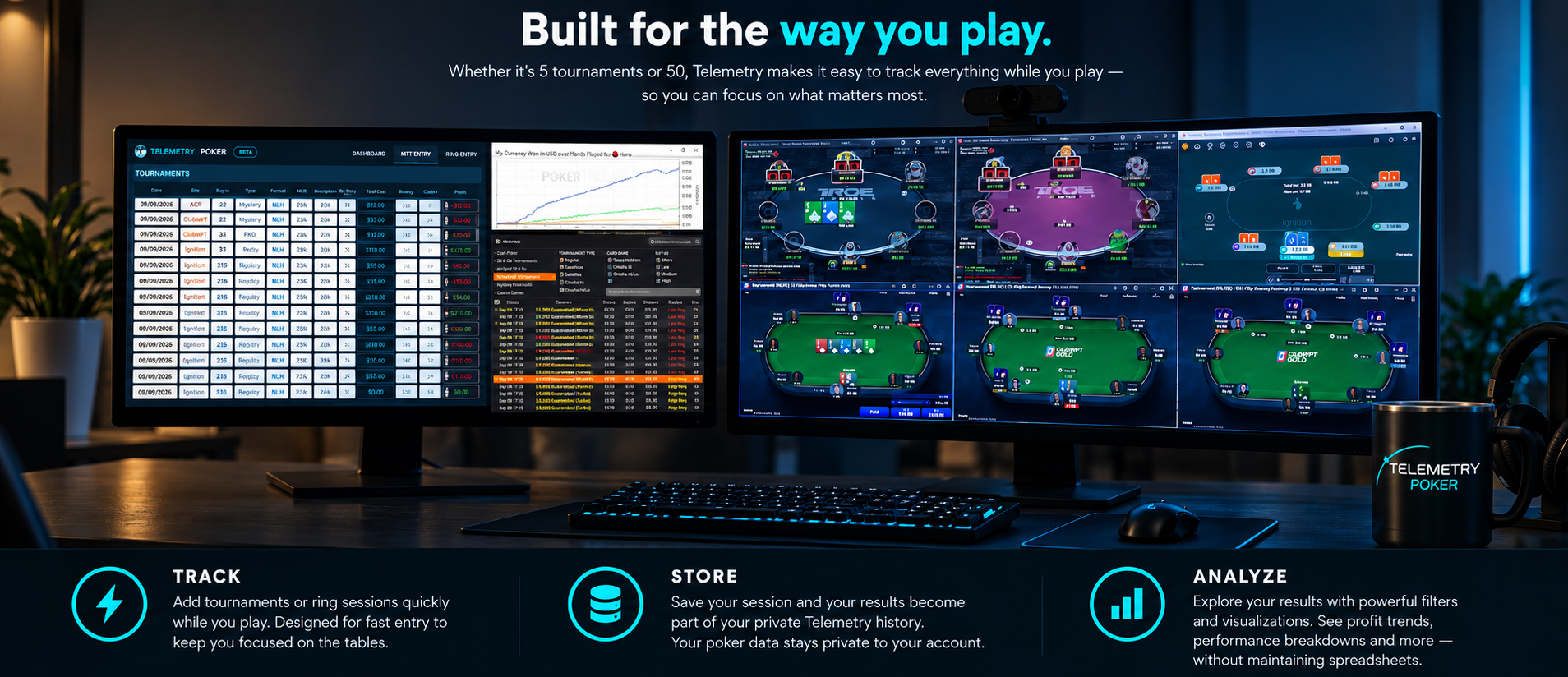
Built for the way you play overview showing Telemetry Poker beside online poker tables and the Track, Store and Analyze workflow

PRODUCT WALKTHROUGH

See Telemetry Poker in action.

Telemetry Poker Product Walkthrough

See fast MTT and ring-session entry, reusable game options, dashboard filters, performance comparisons, Session Explorer and record management in one complete walkthrough.

Music: “Hanging 3” by Nield Grohm (Eugenio Mininni), used under the Mixkit Stock Music Free License.

WHY I BUILT TELEMETRY POKER

I wanted more than spreadsheet tracking.

Sites like ClubWPT Gold don’t allow third-party tracking software such as PokerTracker 4, Hold’em Manager, and DriveHUD. Even sites that do allow tracking software often don’t accurately track MTT tournaments, so I’ve always tracked my results separately.

I wanted an easier way to track my online sessions than using a spreadsheet. I created a fast session-entry system to use while playing multiple tables—one that shows session results in real time, then organizes and saves everything to my own private dashboard.

Telemetry lets me quickly enter MTT and Ring sessions while multi-tabling, keeping my focus on the tables. Then I can step back and understand the bigger picture later.

How does my ROI compare between $55 and $109 MTTs?

How does my ROI in PKOs compare with Mystery Bounties?

How does my ITM percentage and ROI change when I max late-register MTTs?

How does my BB/100 compare after moving from $100NL to $200NL?

That’s why I created Telemetry Session Tracking & Analytics.

CUSTOMIZE YOUR TRACKER

Ready on day one. Yours from then on.

Telemetry starts with built-in poker sites, tournament types, formats and Ring stakes. Add choices when you need them, then keep entry and analysis focused on the games you play most.

MTT

Shape the tracker around your tournaments.

Add sites, tournament types and formats as your game changes. MTT buy-ins found in saved records become available analysis choices.

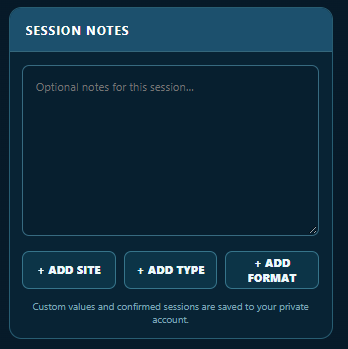
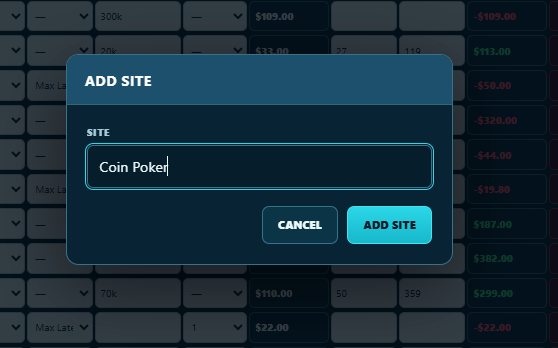
Current MTT session controls for adding a site, tournament type and formatCurrent Add Site dialog

RING

Keep the choices you use close.

Add, hide and restore choices without deleting the records that used them. Ring stakes represented in saved play remain available for analysis.

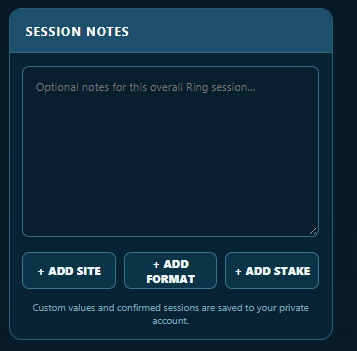
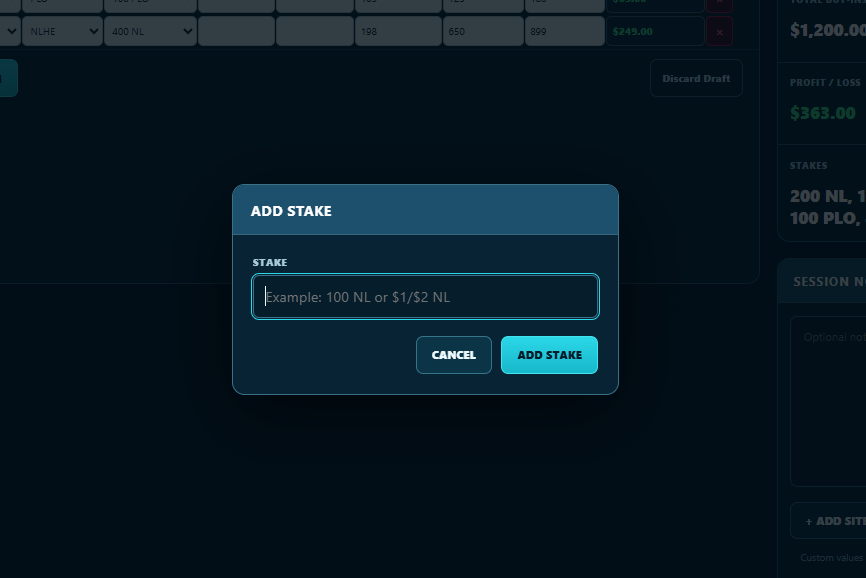
Current Ring session controls for adding a site, format and stakeCurrent Add Stake dialog

VISIBLE OPTIONS

Keep everyday choices focused.

Choose which sites, tournament types, formats, Ring stakes and MTT buy-ins appear in entry and analysis. Show All and Restore Defaults make it easy to bring choices back.

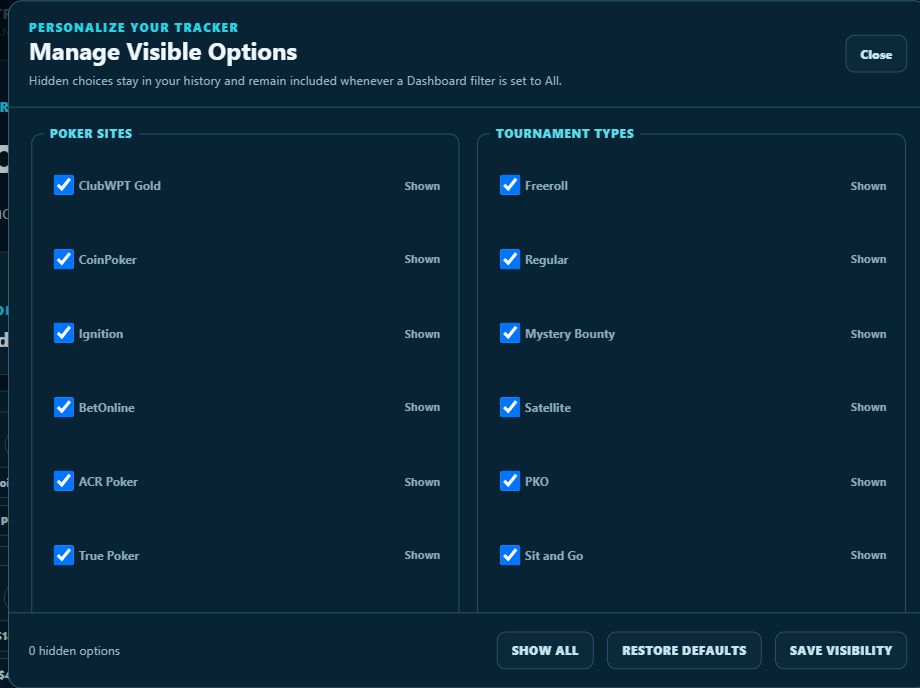
Current default production view shown with every available option visible.

Add as many sites and tournament types as you want, then hide and restore options as needed.

Current Manage Visible Options dialog with poker sites and tournament types marked Shown, zero hidden options, and Show All, Restore Defaults and Save Visibility controls

Your history stays intact. Hiding an option changes what you see day to day; it does not delete historical records. Hidden choices remain in your history and are included whenever a Dashboard filter is set to All.

SESSION ENTRY

Track in real time.

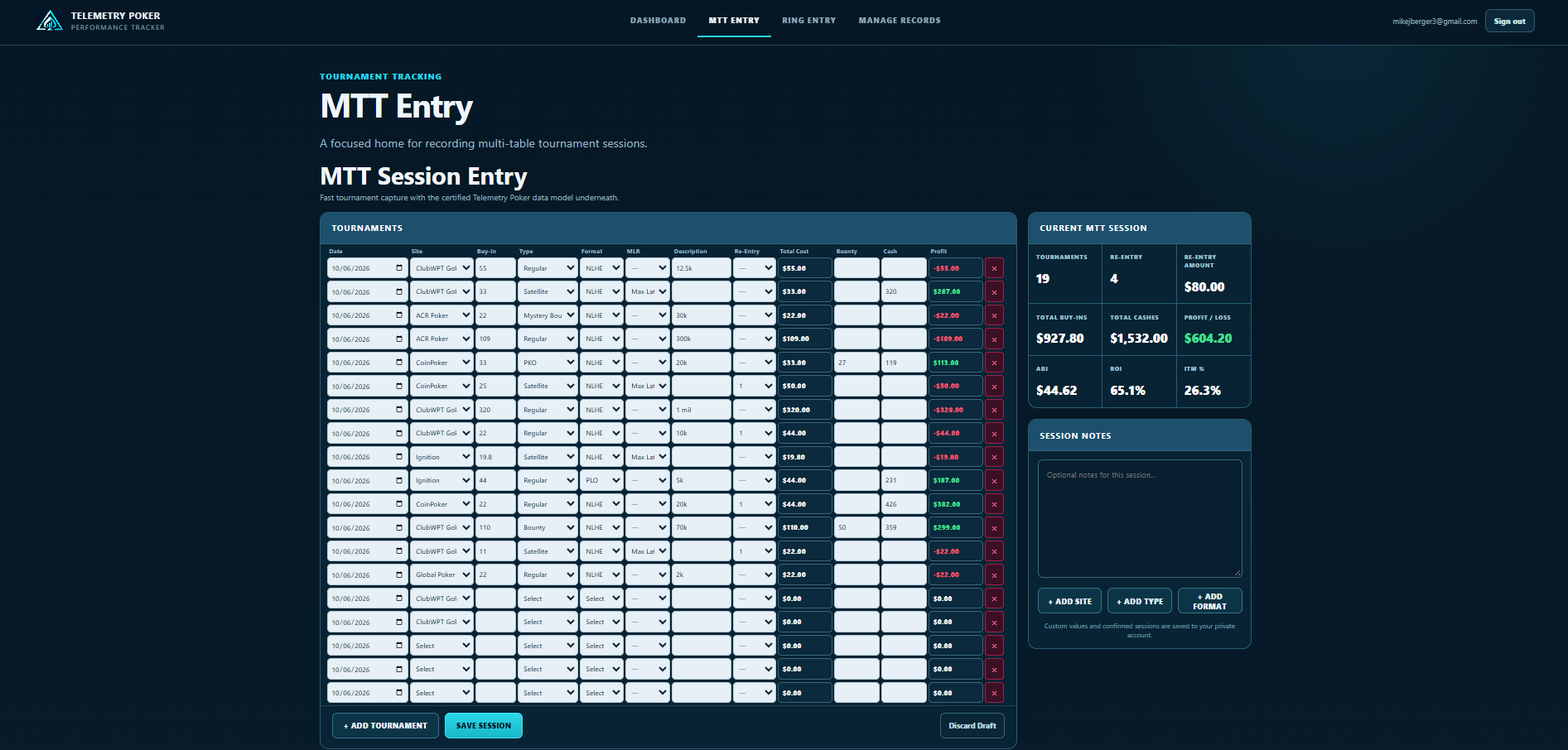
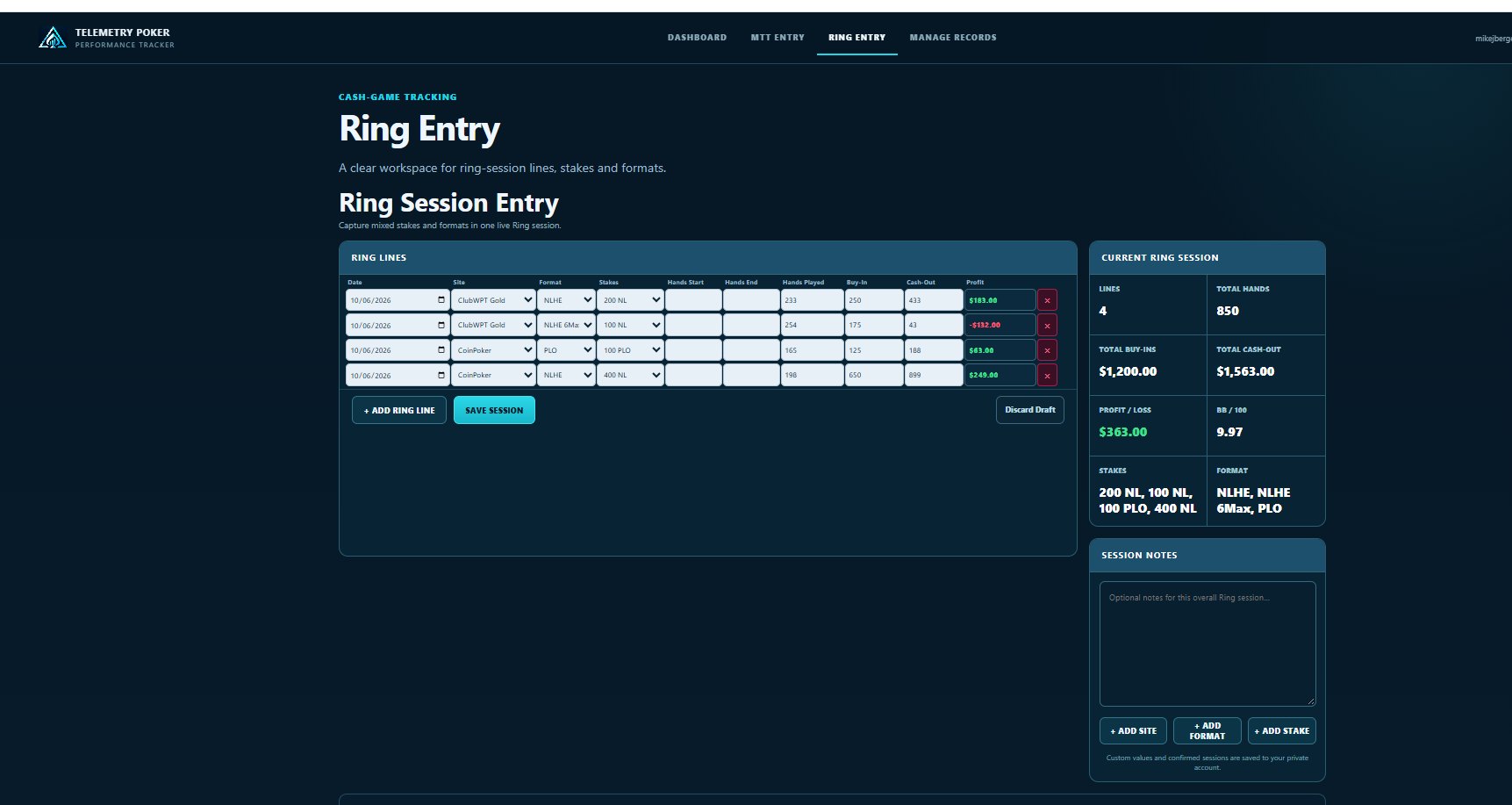
Quickly enter tournaments or ring sessions while you play and watch your current session totals update in real time—without pulling your attention away from the tables.

ENTER RESULTS Fast MTT session entry
Current Telemetry Poker MTT Entry screen with tournament fields and live session totals

SEE YOUR SESSION UPDATE

Your session updates as you play.

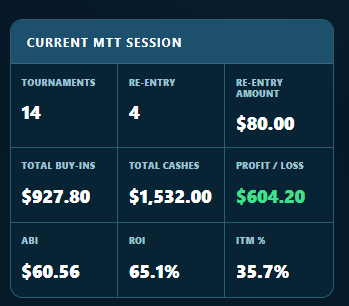
Enter tournament results while you play and Telemetry immediately recalculates your current-session totals.

Current MTT Session summary showing tournaments, re-entries, buy-ins, cashes, profit, ABI, ROI and ITM percentage
RING RESULTS Track hands, stakes and results across cash-game sessions
Current Telemetry Poker Ring Entry screen with hands, stakes and live session totals

PERFORMANCE DASHBOARDS

Understand your results.

Review MTT and Ring performance, then use focused filters and graph details to understand what is driving each result.

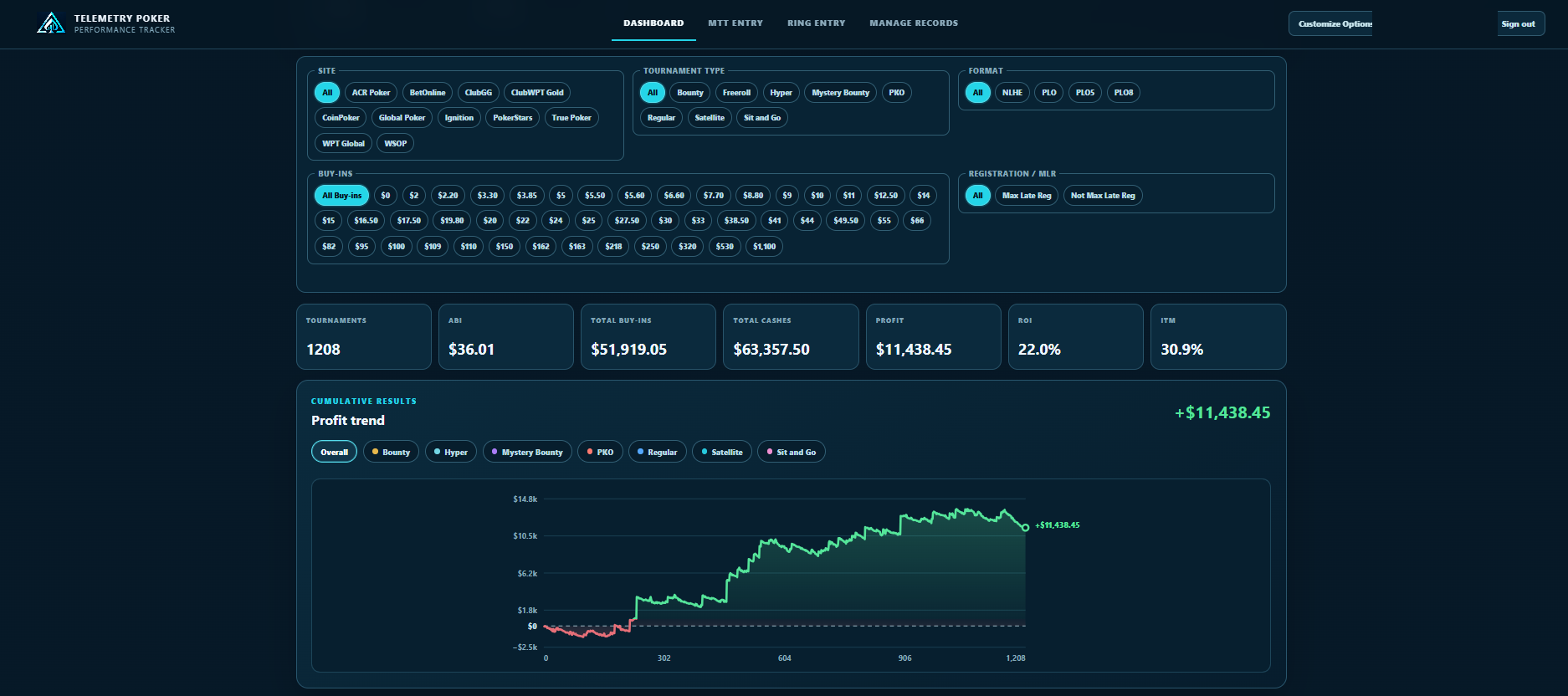
MTT DASHBOARDTournament performance at a glance.
Current Telemetry Poker MTT Dashboard with individual buy-in buttons, performance totals and a green $11,438.45 cumulative profit graph
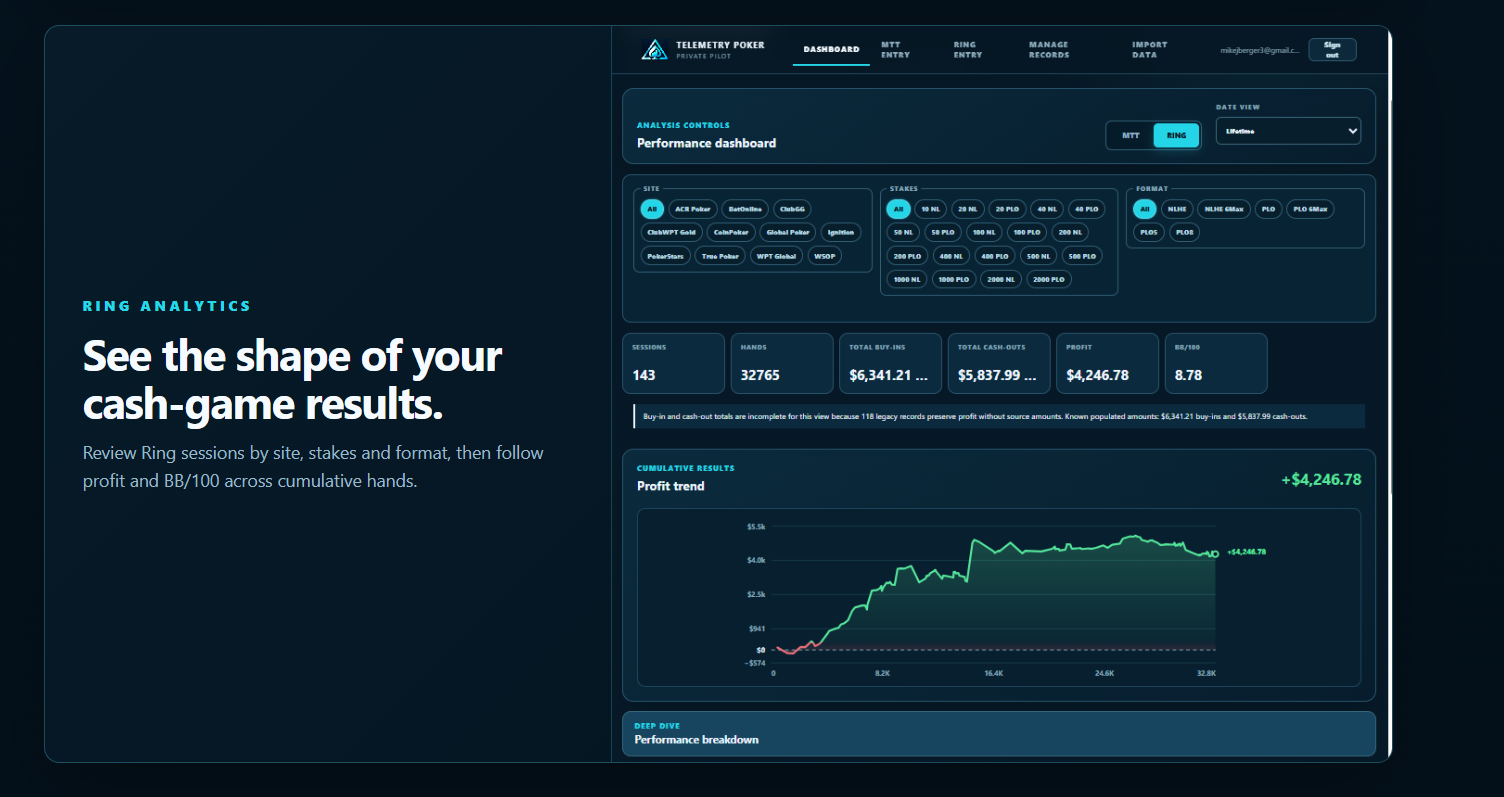
RING DASHBOARDCash-game results across cumulative hands.
Telemetry Poker Ring Dashboard with filters, performance totals and cumulative profit graph

FILTER YOUR HISTORY

Break down the games you play.

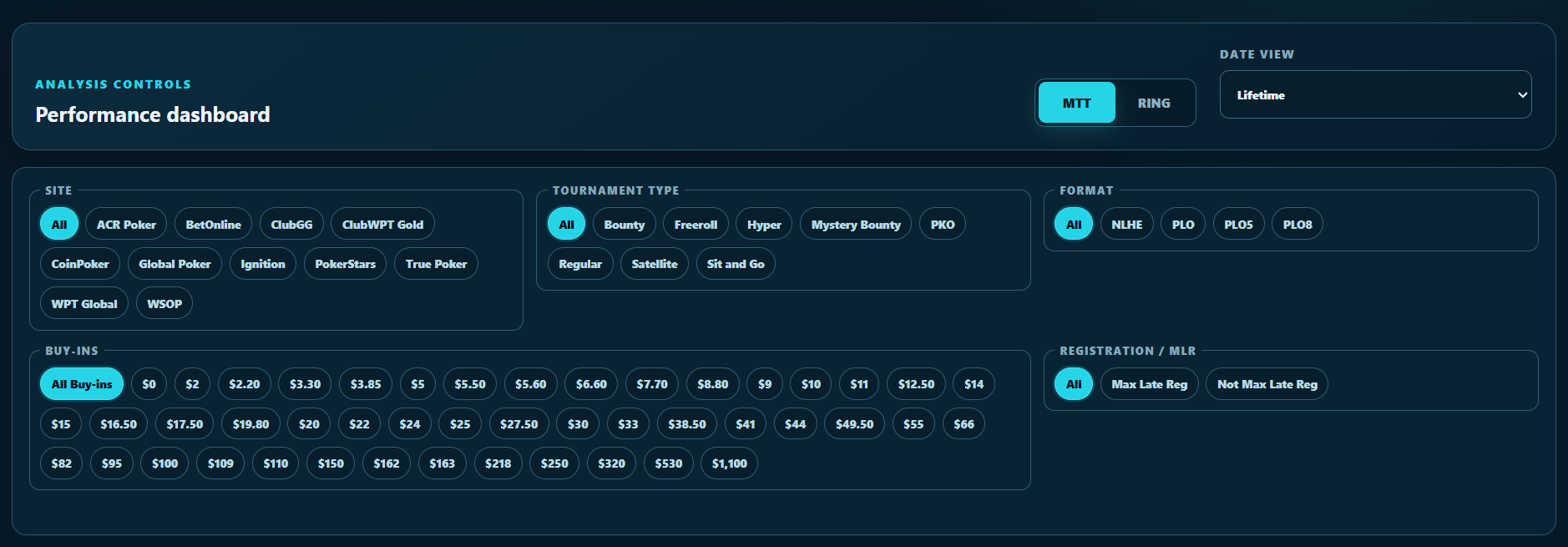
Combine filters for site, tournament type, format, buy-in, registration and time period to see where your results are coming from.

Your dashboard adapts to your game. Custom sites, formats and tournament types become part of your filtering and analysis experience.

Current Telemetry Poker Dashboard analysis controls with individual site, tournament type, format, buy-in and registration buttons

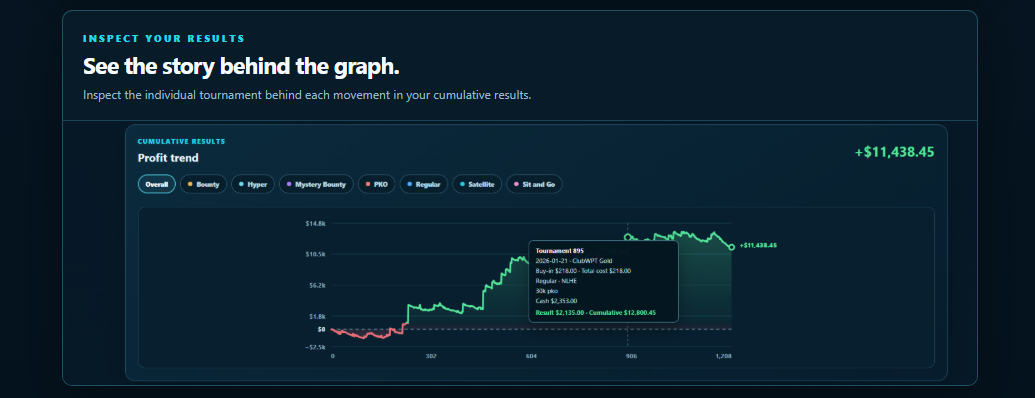
INSPECT YOUR RESULTS

See the story behind the graph.

See what's behind every move. Hover over your graph to inspect the tournament behind each point—including site, buy-in, field size, cash, individual result and cumulative result.

Telemetry Poker cumulative profit graph with an individual tournament tooltip showing site, buy-in, field size, cash, result and cumulative result

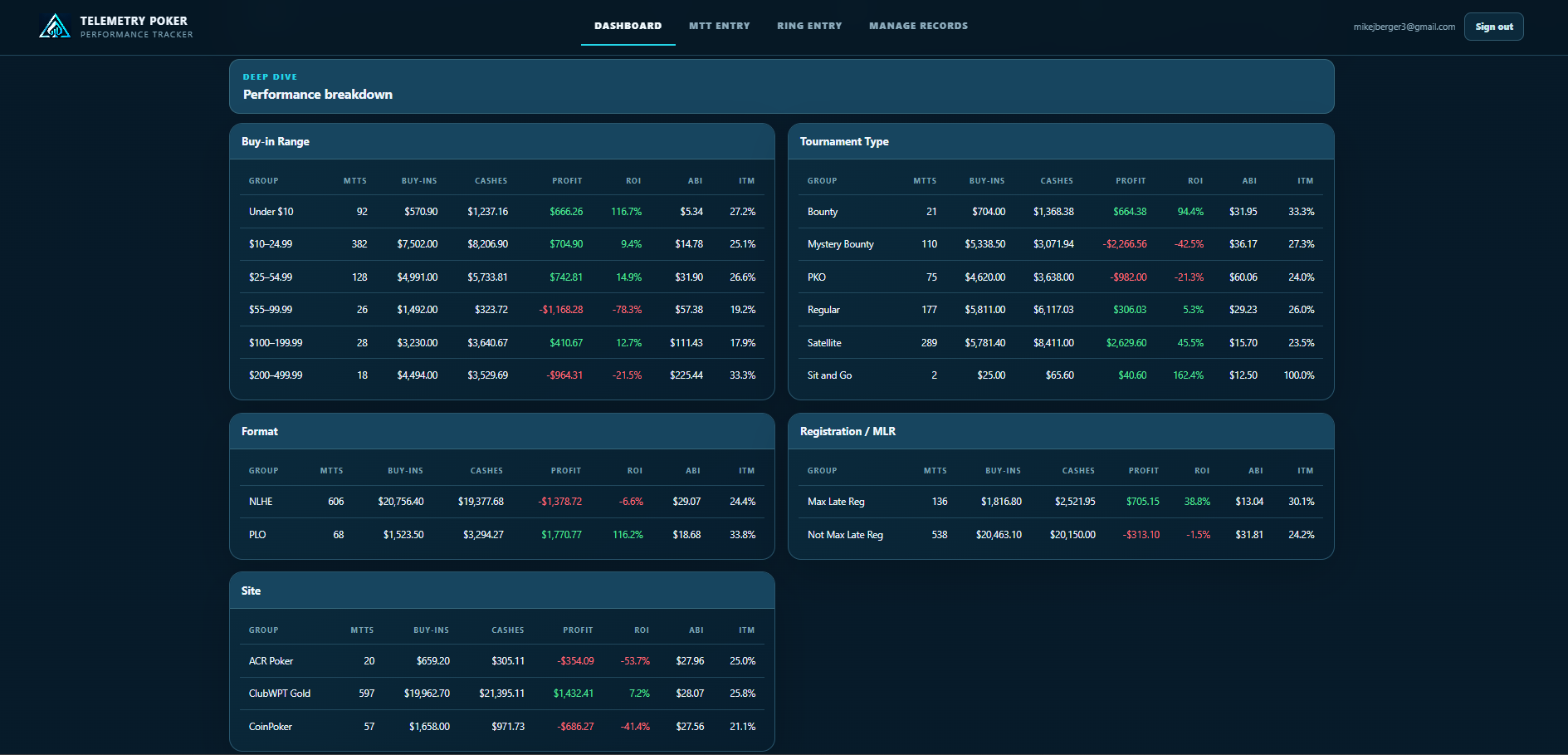
DEEPER ANALYTICS

See what’s driving your results.

Break down your performance by game, site, format, tournament type, registration, buy-in and more.

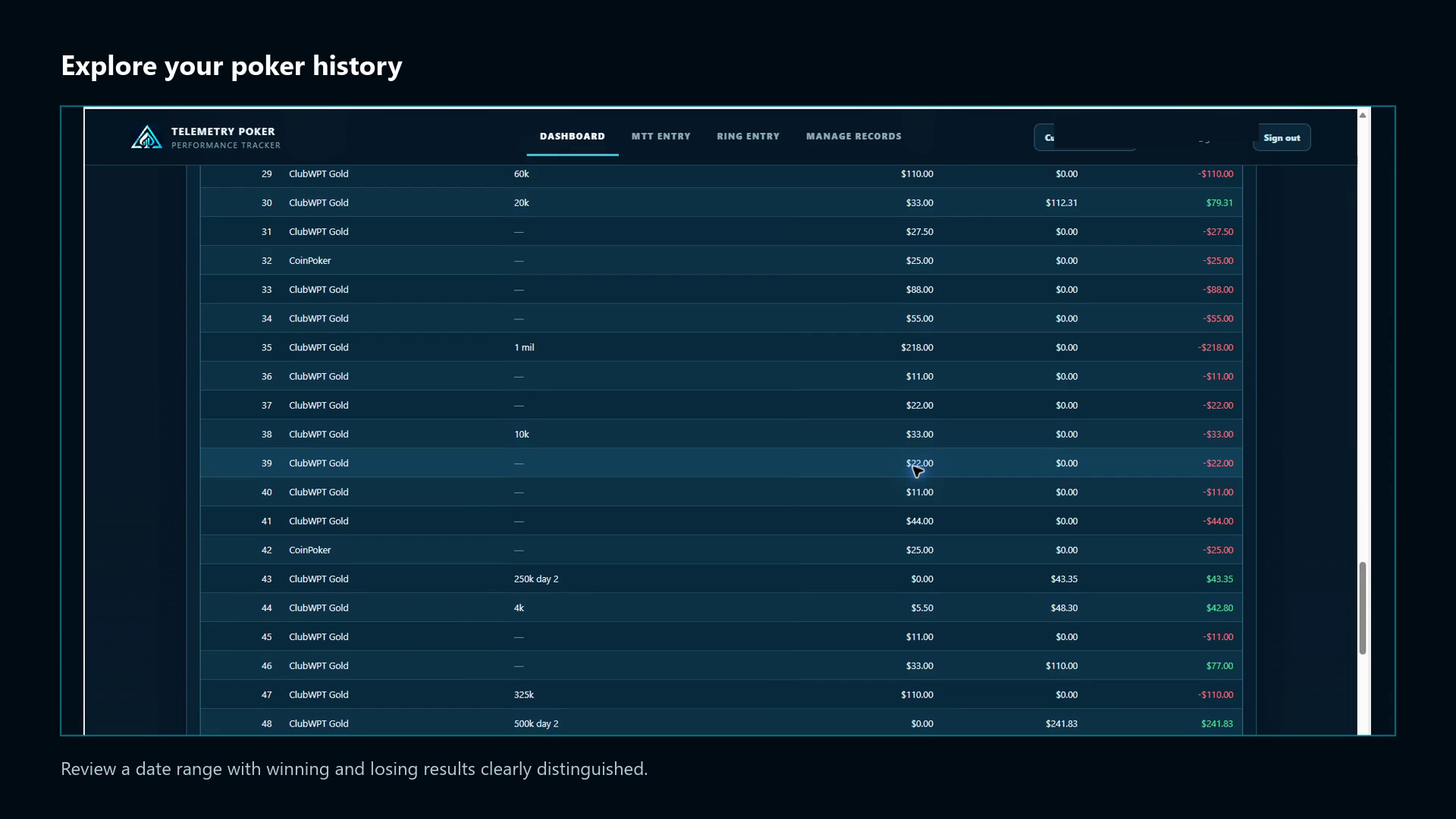
SESSION EXPLORER

Revisit the full story.

Go back to saved sessions and inspect the individual tournaments behind them—site, cost, cashes and profit—without losing the context of the overall session.

Current Telemetry Poker Session Explorer with winning results in green and losing results in red
Winning and losing results are color-coded so individual outcomes are easy to scan.

MANAGE RECORDS

Your history stays useful—and portable.

Review saved MTT and Ring records, correct supported details, and download either your complete lifetime history or the filtered results you are viewing as an Excel workbook.

Exports work with Microsoft Excel and Google Sheets. They are portable history reports, not complete backups of account configuration.

Record lifecycleManage Records

Download Full History (.xlsx)All MTT and Ring records

Download Filtered Results (.xlsx)Records matching the active view

FAQ

A clearer way to track your game.

What can I track with Telemetry Poker?

Telemetry supports both MTT and Ring/cash-game sessions in your private performance dashboard. For tournaments, track details such as site, buy-in, tournament type, format, registration, re-entries, bounties, cashes and results. For Ring, track site, stake, format, hands and session results. Use your saved history to compare Mystery Bounties with PKOs, poker sites, buy-in ranges, Max Late Reg with other tournaments, and more.

Can I customize Telemetry for the games I play?

Yes. Telemetry starts with built-in choices. You can add, hide and restore poker sites, tournament types, formats, Ring stakes and MTT buy-ins. Hiding a choice does not delete the historical records that use it, and hidden choices remain included when Dashboard filters are set to All.

What can I analyze on the Dashboard?

Analyze MTT profit, ROI, ABI and ITM, or Ring profit and BB/100. Follow cumulative results, combine filters, compare Performance Breakdown tables and use Session Explorer to revisit the individual results behind saved sessions.

Can I edit or delete results after I save them?

Yes. Manage Records lets you review saved MTT and Ring records, edit supported session details and notes, and remove records you no longer want included.

Can I download my poker history?

Yes. Manage Records can download your complete lifetime MTT and Ring history as an .xlsx workbook for Microsoft Excel or Google Sheets, including session notes and a summary. The workbook is a portable history export, not a complete backup of Telemetry Poker's database or account configuration.

Is my poker data private?

Your results are associated with your private Telemetry Poker account. They are not presented as a public player profile.

How do I access the tracker?

Click Start Tracking Free to create your free account, or Log In if you're returning. We recommend Continue with Google for the quickest and easiest access—no email verification link needed. Prefer email? You can also sign in securely using a link sent to your inbox.

Ready on day one.
Personalized as you play.

Bring your sessions together, understand your results and build a clearer picture of your game.